What actually matters in a baby journal app
You are choosing a place to keep the most personal photos and recordings you will ever own, for years. Feature lists are long; the things that matter are short.
1. Where do the memories live?
Most baby book apps upload everything to their servers so they can build a shared feed. That means your child’s face, voice, location and daily routine sit in a company database, subject to that company’s terms, breaches and pivots. A private baby journal keeps everything on your phone and only sends something out when you deliberately share it.
2. How fast is capture?
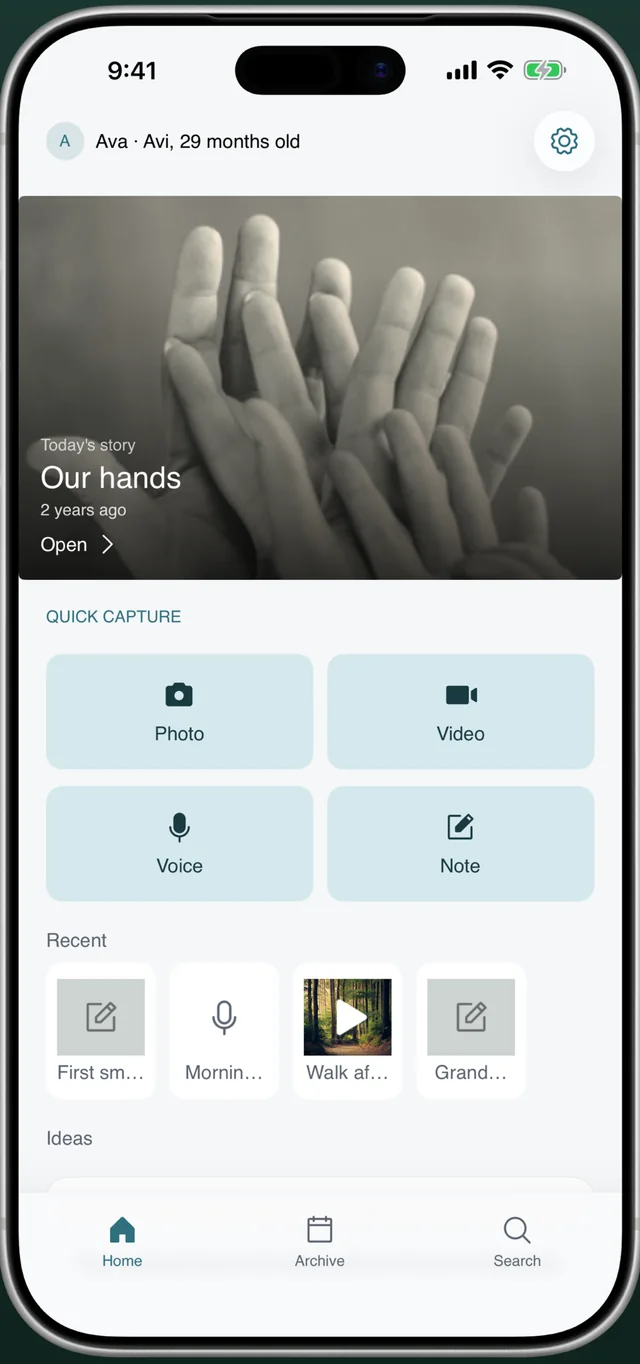
The moment happens while you are holding a baby with one hand. If saving it takes more than two or three taps, you will fall back to the camera roll and the journal dies. Look for a home screen that opens straight into capture.
3. Can it hold more than photos?
The things you forget first are sounds and words: the specific giggle, the mispronounced “bagana”, the bedtime song. A good baby journal app records voice and video and lets you write the story next to the picture.
4. Is there a keepsake at the end?
A timeline you scroll is nice; a book you can print and hand to your child is the point. Check whether the app can export a proper memory book, and whether that export is locked behind a monthly plan.
5. What does it cost over five years?
$4.99 a month is $300 by kindergarten, and if you stop paying many apps lock or delete your memories. Prefer a free app with a one-time upgrade, and check that you can export your data at any time.
How Everkeep answers each question
| What to check | Everkeep |
|---|---|
| Where memories live | On your phone. No account, no server, no feed. You choose when to share or back up. |
| Capture speed | Photo, Video, Voice and Note buttons on the home screen. Two taps to save. |
| Media types | Photos, video, voice memos and written notes, up to 10 per memory. On-device transcription and text scanning. |
| Keepsake | PDF baby book with cover and month chapters (Everkeep Pro), plus a memory movie export. |
| Price | Free to use forever. Everkeep Pro is $9.99 once, shareable with Family Sharing. No subscription. |
| Your data | Standard ZIP backup of everything, any time, saved wherever you like. |
How to start a baby journal in Everkeep
You can be capturing your first memory within a minute of installing the app. There is no sign-up.
- Install EverkeepDownload it free from the App Store or Google Play. Open it and create your baby’s profile with their name and birthday so every memory shows their age.
- Turn on app lock (optional)In Settings, enable Face ID, fingerprint or a PIN. The whole journal is then protected even if someone else picks up your phone.
- Capture your first memoryTap Photo, Video, Voice or Note on the home screen. Add a title and a line about what happened. Everkeep saves it under today’s date and your baby’s age.
- Catch up on the pastHave photos from the first weeks? Add them from your library and change “When did this happen?” to the real date. They drop into the right month chapter.
- Browse the ArchiveOpen the Archive tab to see Chapters by month, All entries or the Calendar. Star anything special to add it to Favorites.
- Make the book when you are readyUpgrade to Everkeep Pro once ($9.99) and tap Create PDF in Settings to export a memory book you can save, print or send to family.
Try Everkeep freePrivate baby journal for iPhone and Android. No account, no subscription, no ads.
Baby journal app FAQ
Is Everkeep a baby tracker for feeds and sleep?
No. Everkeep is a memory journal, not a care log. It is for the moments you want to remember (photos, videos, voice, stories, milestones and growth records), not feeding schedules or nappy counts.
Can both parents use the same journal?
Everkeep has no accounts or cloud sync, so the journal lives on one phone. Many families keep it on one device and share individual memories or the PDF book with the other parent. You can also move the whole journal to another phone with a backup file.
Does it work on both iPhone and Android?
Yes. Everkeep is available for iOS 18.2 or later and Android 7.0 or later, and the backup format is the same on both.