Three questions to ask any digital baby book
Who owns the file?
If the book only exists on a company’s server, it exists at their pleasure. Companies get acquired, raise prices, add ads and shut down. A durable digital baby book is one you can hold as a file: a PDF, plus a backup of the originals.
Is it organised the way memory works?
Camera rolls are organised by the second the shutter fired. Baby books are organised by chapters: “the newborn weeks”, “three months”, “the summer she learned to crawl”. You want an app that groups by month and age automatically, so the book writes its own table of contents.
Can it hold the whole memory?
A picture of the first step is good. The video, plus a voice note of you laughing, plus two lines about how it happened, is the memory. Look for photo, video, voice and text in one entry.
How Everkeep is built as a digital baby book
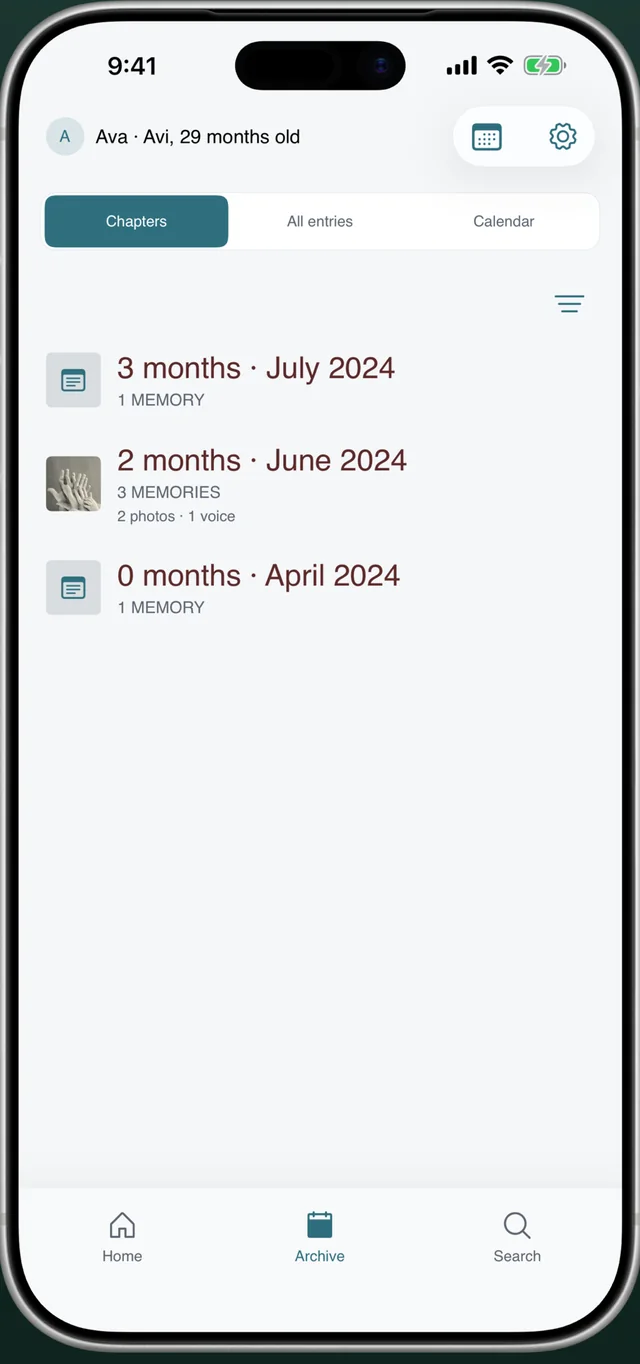
Everkeep’s Archive is literally called Chapters. Each month of your baby’s life is a page: “0 months · April 2024”, “2 months · June 2024”, with counts of photos, voice notes and stories inside. Open a chapter and you are reading that month.
Every memory can carry up to ten photos or videos, a voice recording and a written story, so nothing is split across apps. And because everything is stored on your phone, the book works offline and never appears in anyone’s feed.
Two exports make it permanent: a ZIP backup of all originals (free, any time) and the PDF memory book (Everkeep Pro, $9.99 once). Both are standard formats that will open on any computer decades from now.
How to build your digital baby book in Everkeep
The structure is created for you; your job is just to add moments.
- Create the profileInstall Everkeep and add your baby’s name and birth date. Chapters are calculated from this date, so the book is organised by age from day one.
- Add memories, old and newCapture new moments from the home screen. For the backlog, import from your library and backdate each one; Everkeep files them into the right chapter.
- Write the captions now, not laterA title and a sentence or two is enough. This text becomes the narration of your book and is searchable in the app.
- Check the Chapters viewOpen Archive → Chapters. Each month shows what it contains. Gaps are easy to spot and fill from your camera roll.
- Back up the originalsIn Settings, create a backup. Save the ZIP to Files, iCloud Drive, Google Drive or a computer. Repeat every few months.
- Export the PDF book (Pro)Unlock Everkeep Pro once, then Export memory book → Create PDF. Keep the PDF next to your backup and you have a digital baby book that needs no app to open.
Build a digital baby book you ownEverkeep is free for capture and organisation. The PDF book is a one-time $9.99 unlock.
Digital baby book FAQ
Is a digital baby book better than a paper one?
They do different jobs. Digital is faster to keep up with, holds video and voice, and is searchable. Paper is the object you hand over one day. The best approach is a digital journal you can export as a PDF, which is what Everkeep does, so you get both.
What file formats does Everkeep use?
Backups are standard ZIP archives containing JSON data plus your original photos, videos and audio. The memory book is a standard PDF. Nothing is proprietary or locked to the app.
Can I add scans of paper keepsakes?
Yes. Photograph the hospital bracelet, cards or drawings as a photo memory. Everkeep’s on-device text scanning can read the writing so it is searchable later.